Motorola Motofone F3 Review
posted terribly early in the morning by Constantinos. Filed under Review
I bought the Motorola Motofone after being introduced to it by this post on my friend Nick Baum‘s blog. For as long as I remember, I’ve been reading about how phones keep getting more and more complicated. Yet many people want their phone to do only one thing: make calls. The trick was getting a phone that was usable and friendly at the same time. When Motorola finally came out with the Motofone, it appeared that they had achieved just that. The only problem was that the phone was only available in India! Fortunately for me, I’ve been in India for the last 3.5 months. So I decided to buy one (or two), and write a hands-on review for it. Well, after writing a single-spaced narrative that spanned 3 pages and finding myself only half way through the things I wanted to say about this phone, my friend Nick came to the rescue with a list of questions for me to answer. So I’ll just break my unnaturally long essay into pieces and post the review in interview format-.
Update 2007-03-07: Cross-posted on nickbaum.com
Update 2007-03-27: For those of you looking for a manual of this phone, I found two, in English. Motofone Draft Manual [pdf] is one, and Motofone Digital Manual [pdf] is another. The latter doesn’t contain the list of ‘advanced’ codes.
Without further delay, the brand new Motorola Motofone F3:
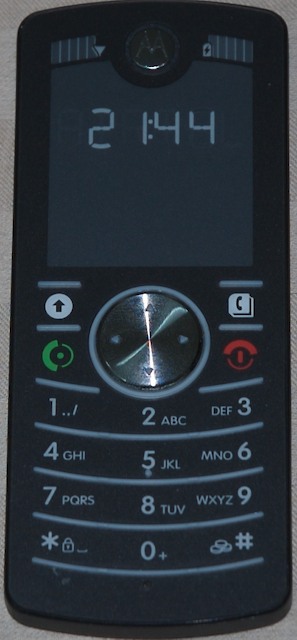
Nick: How is the packaging, the new user experience? What’s included in the box?
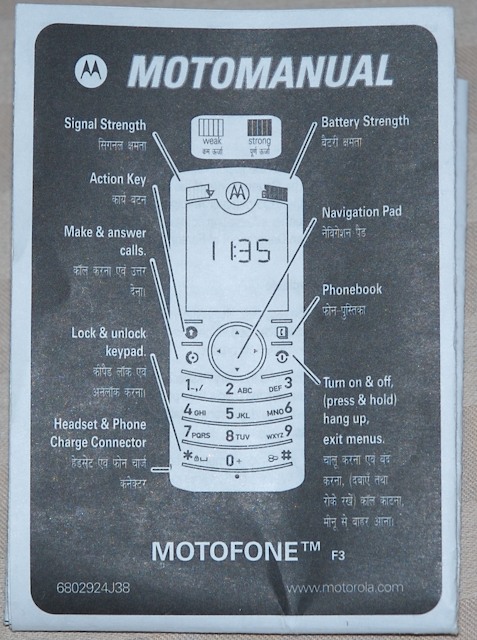 Me: The phone came in a cylindrical container, aka a tube. Opening the box revealed inside the device itself (without any protective plastic bag/screen cover), a battery in a nylon bag, the back cover of the device, a charger, a user’s manual (in Telugu, Kannada and English), and the standard warranty papers.
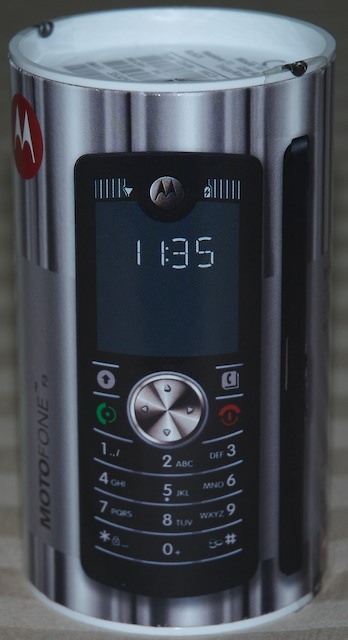
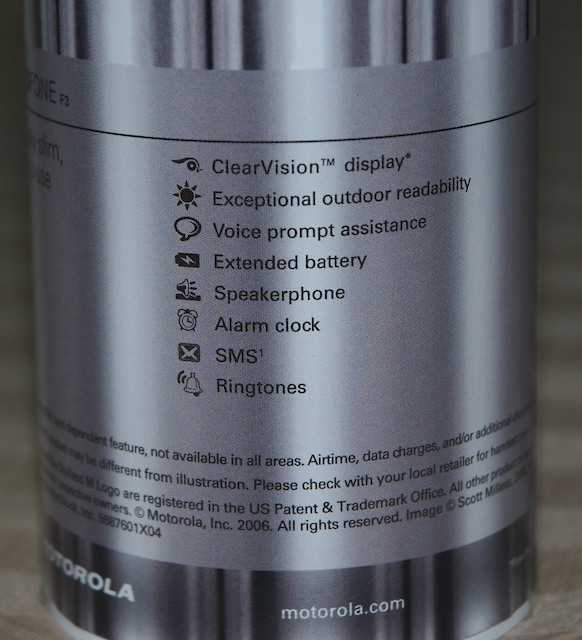 The package is a standard cardboard tube with plastic tops, which makes it feel a bit cheap. However the finish is good, and if it’s sitting on a table it looks better than expected, so it might actually work in places other than India, like Europe or even the US. Most phones come in solid & glossy cardboard boxes with the phone securely tucked away in polystyrene or a plastic casing, but the Motofone’s case is different enough that it might get away with it.
Nick: Tell me about the physical design of the phone. How does it feel?
Me: The phone is extremely light. The face is completely flush, with no nicks or grooves for dirt to get into (not even around the screen, which is simply a transparent piece of plastic as far as the outer shell goes). Even the keys are completely flat, which I love.
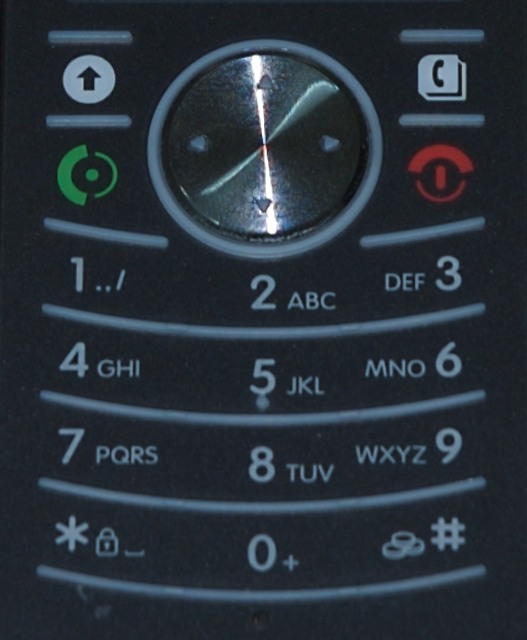 I read somewhere that the phone was built for the weather in countries like India, where there’s a lot of rain and dirt in the air. I have not tested the rain claim, but I will take Motorola’s word for it. As for the dirt, the only place I can see dirt getting into is the speaker, but even that seems hard. Everything else is either completely flat or sealed with rubber. There’s still tactile feedback through the protruding rubber lines above and below the buttons. Both the buttons and the click wheel in the middle feel very natural. The clickable area is quite large, and you can easily feel the button being pressed.
The only input slot is the charger/headphone jack, which is smaller than any other charger jack I’ve seen.
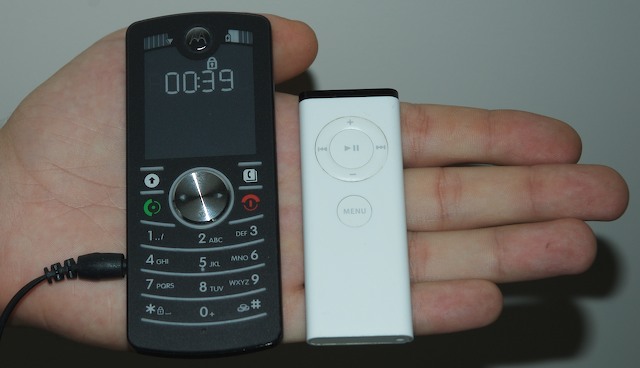 However, the fit of the plug is extremely snug in the phone (it will not fall off if you dangle the phone from the cord, but at the same time it does not require much strength to push it in/take it out), and it seems that it uses the same plug for headphones, which I have not tested. The thickness of the phone is about the same as an Apple Remote.
Nick: How about performance? In practice, how long is the battery life? How is reception?
Me: Motorola claims 300h of stand-by battery life which, for the less mathematically inclined, translates to 12 days. That might be true if you turn on the phone, leave it on a table and never touch it or receive any calls. The screen consumes absolutely no power when it’s not changing the contents of the display, so on stand by the only power drain is the signal reception and updating the time every 60 seconds. However, I would not expect the battery to last anything more than 5 days under any circumstances where the phone is actually being used. I did let the battery run down completely, but I did get a solid 4 days of constant use from it before the 5-segment battery indicator dropped to a single line (just barely dropped below 2, where the last line can easily go for another day).
As far as reception goes, I only have one word: outstanding. I’ve been using this phone for 2 weeks, and I still have not seen the reception indicator fall below the full 5 lines (and no, reception is not generally this good in my area). In line with this, the excellent speakerphone is a feature I did not expect. Voice clarity on this device is up to par with any phone I’ve ever tried, including land lines. I have no problems understanding anything anyone says to me on this phone.
Nick: How does the screen perform in different light conditions? How does it compare to regular screens?
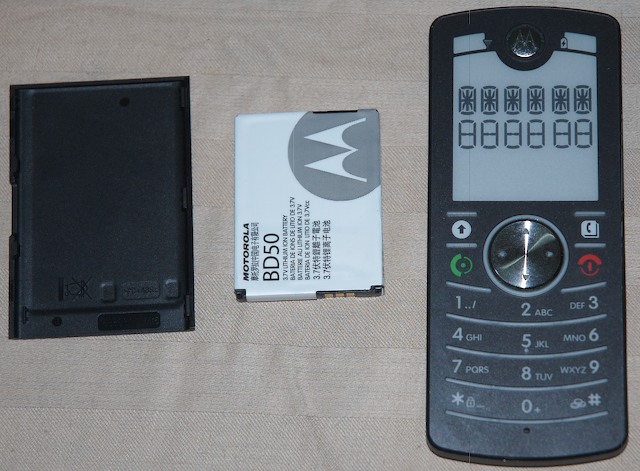 Me: The screen is definitely the most innovative power saving feature of the device. I already knew that the E-ink technology used for the screen requires no power to keep the screen on, but it’s a different feeling when you take out the battery without turning the phone off, and the screen keeps displaying the last characters on it! (Yes, it does reset without any trace when you turn it back on). The contrast is excellent and the characters are clearly visible in any light condition from any angle (unless there’s complete darkness).
This being said, it’s not all rosy. The character display is exactly like the old 16-segment LCD displays of yesteryear. 2 rows of 6 characters, that’s it. What’s even worse, only the first row is used for actual alphanumeric characters, which makes reading messages a big pain. I do believe there’s a valid reason for doing this (read on about the user interface), but it doesn’t stop it from being extremely annoying. Also since the characters are constructed from segments, there’s no notion of upper/lower case. You will see an upper case letter or a lower case letter depending on which one will make the most sense when formed by the segments.
Nick: Describe the user interface? Is it immediately intuitive, or does it take getting used to?
Me:
The interface is by far the most interesting aspect of the device, even more so than the screen. The phone has a language setting, but not in the traditional sense as none of the menus have any text in them. Instead, any action you might perform on the phone and might need some instruction, comes with a voice-over, in the language chosen by the user. As this phone is targeted for the low-income family, there’s a good chance that a user of the phone might not even know how to read. For this reason, I believe the choice to preload the phone with voice messages in the native languages of the region it is being launched in instead of simply having text in different languages is an excellent choice.
 The first time I turned on the phone and entered my PIN, I was greeted by a man speaking in a language I did not understand. After a few seconds, the same man said, in English, “For English, press 3”. Since I bought the phone in the Karnataka district of India, the phone comes with 3 pre-set languages: Telugu, Kannada, and English, where the first two are the official languages of the district. These options come up whenever the SIM card is replaced in the phone, which makes sense. Once the language is selected, if you wish to change it you must either change the SIM, or go through the ‘advanced menus’ (read on).
As soon as I pressed 3, the same voice asked me if I wanted voice prompts while using the phone. 1 for Yes, 2 for No. I pressed 1 just out of curiosity. This option is presented to me every time the phone is switched on. Note that wherever I make a note of what the “friendly voice” says, this is always dependent to whether or not voice prompts are enabled. If they’re not, then the voice will never be heard from again (at least not until you turn the phone off and back on).
Since I had just powered on the phone, I was presented with the option for setting the time on the phone (with the voice telling me “Enter time”). After telling it the time and date, I was pretty much done with the setup.
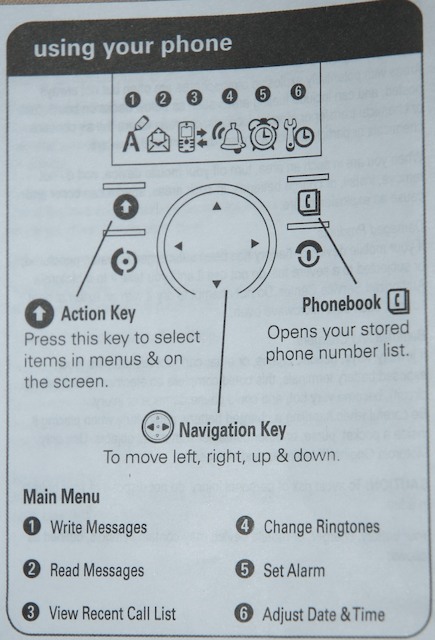 There are exactly 6 menu choices. The menu can be accessed by pressing right or left on the click wheel. Pressing up or down while on standby changes the volume of the phone. The menu itself contains no characters, just icons. The same friendly voice tells you the menu you are on, which you can access by pressing the action key (top left). These choices are (as narrated by the friendly voice): Send a message, Read your messages, Call history, Change ringtone (7 possible pre-defined choices), Set alarm, Change time. Scrolling to the menu you wish to use you can press ‘up’ or ‘action’ and the menu will be selected, where the voice will tell you what you can do (“Write your message” for example).
There are a few other (advanced) options you can mess with: change language, select time format, set voicemail number, keypad tones on/off, auto keypad lock on/off, set SIM pin, SIM pin on/off, restricted calling – phonebook only, prepaid balance display, set balance inquiry number, and the obligatory reset factory settings. All of these options are accessible by pressing *** [3-digit number code] * [action]. These settings obviously require the manual which lists all the 3 digit codes, and are generally the kind of thing you would only set once and then forget about it. I haven’t tried to see if there are any easter eggs in there.
All in all, it took me about 10 minutes to get used to the interface. It did not immediately come to me (I spent a few seconds being utterly confused), but I believe the reason for that was because I’m so used to the standard interfaces that come on every phone. After getting the hang of this one (which was very fast to do so), it became almost second nature.
Nick: How does the address book work?
 Me:
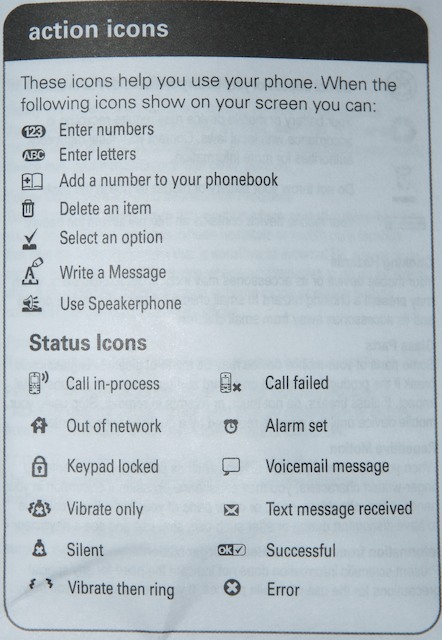
There’s a phone book button (top right) which takes you directly to the phone book. There is no memory on the phone itself for an address book, so it uses the SIM memory which is limited to 12 characters per contact name, and one number per contact entry. Pressing the phone book button will bring up the phone book, which you can navigate with up/down, or press a letter to jump to that point in the phone book. To scroll through the 6 character limit of the display you must press right. Pressing right multiple times will display the phone number of the contact, and then an option to delete the contact (shown as a trash can, you must press ‘up’ to delete it when the icon is shown). Furthermore, each contact has a number associated to it (the SIM card memory location), which can be used for speed dialing. If an unknown number is on the display, an icon appears above the phone book button which indicates that pressing it will let you add that number to your SIM.
Me:
There’s a phone book button (top right) which takes you directly to the phone book. There is no memory on the phone itself for an address book, so it uses the SIM memory which is limited to 12 characters per contact name, and one number per contact entry. Pressing the phone book button will bring up the phone book, which you can navigate with up/down, or press a letter to jump to that point in the phone book. To scroll through the 6 character limit of the display you must press right. Pressing right multiple times will display the phone number of the contact, and then an option to delete the contact (shown as a trash can, you must press ‘up’ to delete it when the icon is shown). Furthermore, each contact has a number associated to it (the SIM card memory location), which can be used for speed dialing. If an unknown number is on the display, an icon appears above the phone book button which indicates that pressing it will let you add that number to your SIM.
The Call History menu has a memory of the last 15 dialed/received calls (the menu icon indicates whether the number was dialed or received, depending on the direction of the arrow).
Nick: How does text messaging work?
Me: There are two ways you can send a text message. The first way is to start writing a message by using the “Send a message” menu (first choice), then entering the number or going through the phone book. Alternatively, whenever a number or a contact (either through the phone book or through the Call History menu) is visible, a “Send a message” action is available and accessible through the action button, which will take you to the same “Send a message” menu. Writing the message and pressing send will send the message to the number you already selected.
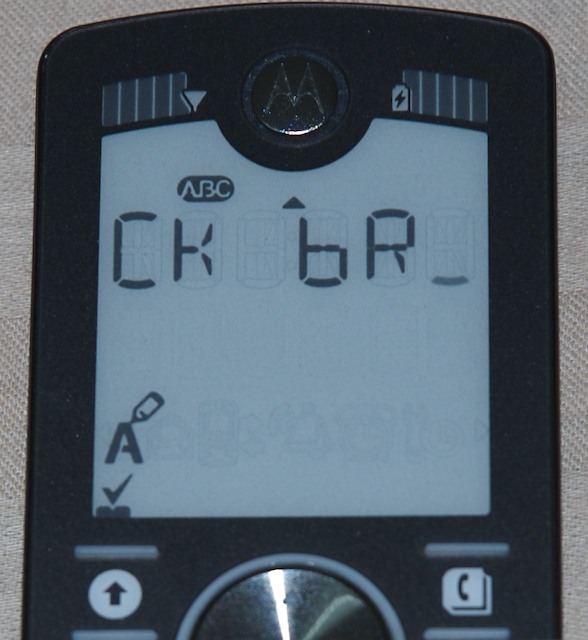 I already mentioned that only the top row is used for text, and that this makes reading messages extremely annoying. However, you do get used to it. If a word is less than 6 characters long, it will definitely be shown in its entirety. I.e. if you receive the message “hi how is california?” then “hi how” would be on the first screen, “is” would be on the second and “california” would span two screens, split at the ‘o’. The reason behind all this, in my opinion, is consistency. Browsing anything (messages, contacts, call history, etc) is a top to bottom action, and reading a message is a left to right action. If the message spanned two lines, it might be a bit more confusing, but the initial confusion might be worth the convenience. On the up side the response time of any action is next to nothing, so reading a message on this phone is NOT considerably slower than on any other phone, provided you’re not using T9 or any other sophisticated input method. The only way a message can be composed is by typing each letter in the standard way. Furthermore, there’s no ‘back’ button in the sense that you can navigate your message. If you make a mistake, you have to erase all the letters from the end of the message to the mistake in order to correct it, and then type everything again.
Nick: What do you like best about the phone?
Me: I’d have to say the large characters that display the time, the visibility of the screen, and the intuitiveness of the interface (after you take 10 minutes to learn it, mainly because we’ve all been conditioned to expect a lot of counter-intuitive interfaces from phones). Oh, and the price. You just can’t beat a $40 price tag on a phone that looks this good.
Also, I was surprised by the alarm. It’s quite loud, annoying, and must have a very well constructed sound loop because when it starts “chirping”, it appears as if the frequency/tone of the sound is slightly randomized, so it’s not a constant beat. Let’s just say it has more success waking me up than most other alarms I’ve tried (with the possible exception of The Matrix soundtrack CD starting at full volume).
Nick: What do you miss most? Is the simplicity a blessing or a curse?
Me: I think what I miss the most is the ability to synchronize my contact list with my mac, and slightly less I miss being able to connect my mac to the internet through the phone from wherever I am. However I still force myself to not carry my bluetooth enabled phone everywhere with me, because I believe having that kind of access to the internet should be reduced. As a computer scientist I spend a LOT of time on the internet as is, and having the ability to connect to the internet from anywhere at any time is just distracting. Feel free to disagree with me on this.
Beyond that, I do not miss the camera, the color screen, or the mp3 capabilities (I even have an iPod that I never use). If anything, I’d say the simplicity is a blessing. I never really used any of those features on my phones for any reasonable purpose, and simply having them there caused me to take ugly photos, waste time with 100px color photos, and suffer through low quality songs. Granted there are a lot of smartphones out there that get a lot of these things right, and maybe it is convenient to some to have a low quality 2MP camera in their pocket at all times. As far as I’m concerned however, if I believe I’ll want to take some photos, I’ll take a real camera. There’s just no way a phone can be designed to do all those things, and at the same time be small, light and usable. It always takes away from the primary purpose of the phone: making calls; which is why I believe the simplicity of this phone is a step in the right direction.
Nick: What are the greatest flaws of the phone? How would you improve it?
Me: I’d have to say the way the screen displays the characters. It seems that e-ink technology is able to create finer text, though I don’t know how that would affect the stand-by battery life (not that it matters much in real-life terms). Reading/Composing messages is troublesome at best, which is a problem concerning a lot of cellular communication now occurs via texting. I realize that a lot of the marketing around the phone is targeted to people who potentially don’t know how to read and/or write, but it’s a mistake to not consider the vast number of people who do and will be using this phone for that purpose. Other than that, I couldn’t be happier with it.
Nick: How popular is the phone in India? How is it marketed?
Me: I have not seen any ads for it, nor have I seen anyone else carry it or use it. That being said, I had a hell of a time finding a unit, as it was out of stock in every shop I went to. On the flip side, one shop owner I chatted up said they only brought 20 units total which sold in a couple of weeks, but they have no plans of bringing more. A few other stores hadn’t even heard of the device. I was finally able to locate a store that was having some stock brought in, and I reserved a device from them. The store attendant seemed to be very curious as to why I would choose a phone that had no features, and kept trying to get me to buy something else. Then again I’m in Mangalore, which is a city of 800,000 people in a country of 1.2 billion, and is also considered by many as a backwater village (i had to go to 4 different computer stores to find a 6-pin to 6-pin firewire cable). It’s extremely likely that Motorola has just not focused any marketing efforts in my parts of India, but I can’t confirm that.
Nick: Would you use this as your primary phone in the US?
Me: Probably. I’ve definitely given up a Nokia 6230 and an Ericsson K700i for this phone. Both of the other phones are turned off and stuck in my closet. That being said, I would not get rid of secondary phone with some more wireless capabilities, because I often find myself needing some mobile access which a simple phone cannot provide. I don’t know if I’d give up a blackberry for it, as I’ve never owned one (re: my comment on the simplicity of the phone).
Update 2007-03-28: Since some people have started adding undocumented key codes to the comments, I’ll try to maintain a complete list here and update it as more undocumented settings codes come up.
To access the advanced settings, press * * * [number code] * [action]
| Phone Setting | Number Code |
|---|---|
| Reset Factory settings | 000 |
| Restricted Calling (Phonebook only) ON | OFF | 160|161 |
| Keypad tones ON | OFF | 250|251 |
| Auto keypad lock ON | OFF | 260|261 |
| Set SIM Pin | 300 |
| SIM Pin ON | OFF | 310|311 |
| Select time format | 470 |
| Prepaid Balance Display ON | OFF | 500|501 |
| Voice Prompts ON | OFF (can also be toggled by pressing [action] on the volume menu) |
510|511 |
| Change Language | 520 |
| Set Balance Inquiry Number to # * | 642 |
| Set Voicemail number | 644 |
Those are the ‘official’ codes, covered in the manual. Now for the experimental part…
Note: Use these at your own risk, even before these codes were posted here phone numbers were lost from a SIM card because of them, so back up your numbers before you use them!
| Undocumented Codes – Use at your own risk! | |
|---|---|
| Display total time of accepted incoming calls | 111 |
| Display total time of outgoing calls | 121 |
| Switch Audible call minute counter (beep) ON|OFF | 130|131 |
| Region Code display ON | OFF | 400|401 |
| List available networks with option to change to another network | 402 |
| Display network currently receiving service from | 480 |
| Display list of networks within range | 481 |
| View / Edit Service Cell Number (SMS Service) | 643 |
| Delete ALL stored messages | 700 |
| Enter SMS prepay query code (?) | 701 |
The following codes work AS IS, i.e. without entering the * around them
| Phone information details | * * 9 9 9 9 * [action] |
| Cell phone serial number | * # 0 6 # [action] |
That’s it for now! If you find more, post them in the contents, I’ll pick them up and put them here.
1. Comment by Constantinos
on 3 Apr 2007 @ 3:13 pm
[quote comment=”894″]One of the comments here indicates that it’s a different physical phone for each pair of bands. Is that true? Or is there a way to switch which pair of bands it operates on? I would really like to get this phone working here in the US.[/quote]
I’m afraid it’s true, you’re gonna need a new device… Sorry.
2. Comment by Max Hollemans
on 4 Apr 2007 @ 2:00 am
Nice movie in which the Motofone is reviewed and… mistreated!
It keeps working 🙂
http://www.youtube.com/watch?v=iwHPK1LMXtk
3. Comment by doncze
on 4 Apr 2007 @ 8:22 pm
*#06# = Cell phone serial number
F3 inside
http://www.volny.cz/schweitzer/MOTOFONE_F3/
4. Comment by Geoff
on 4 Apr 2007 @ 11:59 pm
Anyone been able to get hold of a headset for this phone yet?
Also, I’ve found that to get the speakerphone to work I need to press the action button twice. I guess it’s a feature to prevent you from accidentally deafening yourself.
5. Comment by Constantinos
on 5 Apr 2007 @ 12:10 am
[quote comment=”905″]Anyone been able to get hold of a headset for this phone yet?
Also, I’ve found that to get the speakerphone to work I need to press the action button twice. I guess it’s a feature to prevent you from accidentally deafening yourself.[/quote]
Sorry, no luck on this end for the headset. I asked around, but nobody in India seems to know that this phone has a headset accessory!
As for the speakerphone, yes, this is a feature (documented in the manual as well).
6. Comment by Sue Little
on 5 Apr 2007 @ 12:38 am
[quote post=”73″]*#06# = Cell phone serial number[/quote]
Nice one!
Thanks.
Bought in UK. Lovely design. I wanted a phone with an alarm and was told the F3 didn’t have one! It does and it works well!(I let the vendor know!)I always carry my digital camera and pda so I just don’t need anything else.
Nice site on the design concepts (by the designers) can be found at http://direct.motorola.com/hellomoto/motofone/experience/experience/index.html
I love this phone because I can use it without my reading glasses! This is a boon when you use your phone as an alarm clock! Scrolling to read a message is not a pain – having to find your glasses to read a message is!
Another positive is that it works inside a plastic bag when I am gardening!
Finally at this sensible price is anyone likely to steal one!
Must bookmark this site!
7. Comment by Sue Little
on 5 Apr 2007 @ 1:03 am
I have a different set of instructions. This may be useful…
Hold the * button for 2 seconds to set/unset the lock on the keyboard.
A “lock” symbol appers on the screen when the keyboard is locked.
To change ringer to “vibrate” press the down arrow navigation key until the phone vibrates.
If your voicemail number is set as phonebook contact 1, press and hold the 1 key, to quickly access your voicemail messages.
8. Comment by doncze
on 5 Apr 2007 @ 2:31 am
full specs : Single jack for power and HEADSET!!!
downloadable monophonic and imelody ring tones
9. Comment by Constantinos
on 5 Apr 2007 @ 1:57 am
[quote post=”73″]Hold the * button for 2 seconds to set/unset the lock on the keyboard.
A ‘lock’ symbol appers on the screen when the keyboard is locked.[/quote]
Actually I don’t use this method. I press the action button and then the star button. It’s 2 buttons vs 1, but there’s no waiting involved 🙂
Same to unlock…
10. Comment by Compass
on 6 Apr 2007 @ 7:41 am
By accident I found another code:
***643*
This code will display the phone number that is used to send and receive SMS, or so was told to me by a person that works in a shop for my provider.
Important: DO NOT PRESS THE LEFT ARROW ON THIS SCREEN! IF YOU DO YOU’LL DELETE THE NUMBERS FROM RIGHT TO LEFT AND PERHAPS LOSE THE PHONE NUMBER!
Write it down if you want to, but I recommend that you only navigate (up and down arrows) and use the action button. If you change this number by mistake you’ll disable your phone to send or receive SMS.
You have been warned.
Compass.
11. Comment by Joost
on 6 Apr 2007 @ 5:23 pm
aah ok, thanks for your help!
12. Comment by Joost
on 6 Apr 2007 @ 5:54 pm
Ok, I just found out another code from another website:
***402* gives you a list of available providers and gives you the option of choosing one
13. Comment by Joost
on 6 Apr 2007 @ 4:53 pm
[quote comment=”876″]
[quote comment=”824″]
[quote post=”73″]481 -> shows a list of available providers (and maybe a possibility to choose one?)[/quote]
This is cool… Yes, it will let you select one![/quote]
Hi,
I just got this motorola phone and I was wondering how I can select another provider..I tried to do the above thing, but the only thing I could do is looking at those providers, but choosing….Well, that doesn’t work…So please feel free to help 😉
Cheers,
Bianca[/quote]
Same question… how do you select a provider?
thanks!
14. Comment by Constantinos
on 6 Apr 2007 @ 5:15 pm
[quote post=”73″]I just got this motorola phone and I was wondering how I can select another provider..I tried to do the above thing, but the only thing I could do is looking at those providers, but choosing… Well, that doesn’t work…So please feel free to help[/quote]
Hmm… I’m not so sure if it does work anymore. It appeared to work on my phone, but now I’m not so sure it did (I have to confess, I’m not very persistent at testing, it looked like it was working, so I assumed it would… never actually managed to get a connection to a different provider)…
15. Comment by Compass
on 6 Apr 2007 @ 11:15 pm
About ***400* and ***401*
One thing I noticed when I used ***401* (disable) is that only the provider name appears now. With it enabled I saw the provider name, state name (abbreviated) and state code scroll on the screen.
Still not sure what this does, but I suspect that perhaps it might stop scanning for the provider from time to time as it does? If I’m correct, I’m quite sure this could extend the battery even more.
After ***400* it went back to normal. You can test it by pressing the on/off after enabling or disabling. I believe it should act the same for everyone with the same phone.
Compass.
16. Comment by Max Hollemans
on 7 Apr 2007 @ 2:46 am
[quote comment=”935″]About ***400* and ***401*
One thing I noticed when I used ***401* (disable) is that only the provider name appears now. With it enabled I saw the provider name, state name (abbreviated) and state code scroll on the screen.
Still not sure what this does, but I suspect that perhaps it might stop scanning for the provider from time to time as it does? If I’m correct, I’m quite sure this could extend the battery even more.
After ***400* it went back to normal. You can test it by pressing the on/off after enabling or disabling. I believe it should act the same for everyone with the same phone.
Compass.[/quote]
It’s what we in the Netherlands call the Region Code. It shows in what region you’re in. Not all providers offer that service. My provider doesn’t. So for me it doesn’t matter if 400 is on or off, I always get the same display content.
17. Comment by Onikon
on 7 Apr 2007 @ 3:28 am
Does anyone know what the sign (is it an “I”?) on the left side of the display beside the time means? When the F3 changes to the time-display, the phone symbol on the upper left side blinks about three times with the “I”-symbol. After that, the phone symbol disappears and does not blink anymore.
Any ideas?
Have a look at the photos:
http://img262.imageshack.us/img262/5627/f31ax3.jpg
http://img53.imageshack.us/img53/2200/f32ba8.jpg
Strange thing, because with another SIM-Card of a different provider there is neither the phone symbol on the upper left nor the “I”.
18. Comment by Constantinos
on 7 Apr 2007 @ 12:16 pm
[quote comment=”931″]Ok, I just found out another code from another website:
***402* gives you a list of available providers and gives you the option of choosing one[/quote]
Good call, yes I’ve actually confirmed that this works 🙂
19. Comment by Onikon
on 8 Apr 2007 @ 12:32 am
Hidden code: ***111* shows “46” and a symbol of the call history.
Any ideas?
20. Comment by Onikon
on 8 Apr 2007 @ 12:52 am
Ok, found it out myself. ***111* shows the number of accepted incoming calls.
21. Comment by Onikon
on 8 Apr 2007 @ 12:57 am
Sorry for another post (cannot edit my old posts)…
***121* shows the number of outgoing calls.
22. Comment by sebastian
on 9 Apr 2007 @ 5:15 pm
Hi!
I’v got this very nice phone from my provider t-mobile in germany. I like it very much. The only problem is that I need to be sending my own number, when I call others. It doesn’t do that.
Does anyone know the key code, which activates that fuction?
23. Comment by vala
on 9 Apr 2007 @ 5:16 pm
how to loud sound message tone f3?
plz hellp me ?
24. Comment by Constantinos
on 9 Apr 2007 @ 7:48 pm
[quote comment=”964″]how to loud sound message tone f3?
plz hellp me ?[/quote]
There’s no way to do that that I know of…
25. Comment by Constantinos
on 9 Apr 2007 @ 7:52 pm
[quote comment=”963″]Hi!
I’v got this very nice phone from my provider t-mobile in germany. I like it very much. The only problem is that I need to be sending my own number, when I call others. It doesn’t do that.
Does anyone know the key code, which activates that fuction?[/quote]
Did you try any of the ‘unknown’ on/off codes?
26. Comment by Constantinos
on 9 Apr 2007 @ 7:58 pm
[quote comment=”954″]Ok, found it out myself. ***111* shows the number of accepted incoming calls.[/quote]
Are you sure this is the number of incoming calls and not their duration?
27. Comment by sebastian
on 9 Apr 2007 @ 9:18 pm
[quote comment=”966″][quote comment=”963″]Hi!
I’v got this very nice phone from my provider t-mobile in germany. I like it very much. The only problem is that I need to be sending my own number, when I call others. It doesn’t do that.
Does anyone know the key code, which activates that fuction?[/quote]
Did you try any of the ‘unknown’ on/off codes?[/quote]
Yes, I did try 130/131 and 400/401 … they did’n do it.
28. Comment by Onikon
on 9 Apr 2007 @ 10:11 pm
@Constantinos
Yes, you’re right, my fault
29. Comment by Ronald
on 10 Apr 2007 @ 12:05 am
I have a question.
In the signal strength area is one segment scrolling from left to right. When completely right, two segments becomes black and then the process starts again. Who does know the meaning of this?
30. Comment by Constantinos
on 10 Apr 2007 @ 12:30 am
[quote post=”73″]In the signal strength area is one segment scrolling from left to right. When completely right, two segments becomes black and then the process starts again. Who does know the meaning of this?[/quote]
It means your phone is trying to connect to a service provider, or that its searching for a signal. Either way, if it keeps doing that, then it means you don’t have a signal you can connect to.
31. Comment by Ronald
on 10 Apr 2007 @ 12:44 am
[quote post=”73″] In the signal strength area is one segment scrolling from left to right. When completely right, two segments becomes black and then the process starts again. Who does know the meaning of this?
It means your phone is trying to connect to a service provider, or that its searching for a signal. Either way, if it keeps doing that, then it means you don’t have a signal you can connect to.[/quote]
The strange thing is that the phone works fine. See also the picture at http://www.gsmarena.com
The moment i dial a number all the segments become black! Finished the coversation, the signal indicator scrolls again and again only one element is visible.
32. Comment by ozjin4
on 10 Apr 2007 @ 4:00 pm
[quote comment=”938″]Does anyone know what the sign (is it an “I”?) on the left side of the display beside the time means? When the F3 changes to the time-display, the phone symbol on the upper left side blinks about three times with the “I”-symbol. After that, the phone symbol disappears and does not blink anymore.
Any ideas?
Have a look at the photos:
http://img262.imageshack.us/img262/5627/f31ax3.jpg
http://img53.imageshack.us/img53/2200/f32ba8.jpg
Strange thing, because with another SIM-Card of a different provider there is neither the phone symbol on the upper left nor the “I”.[/quote]
I noticed the “Out of network” symbol (house with the cross) is also on. Is the SIM card from the service provider you bought the phone from or did you buy it outright.
Only possible explanation is the phone is locked to a network.
33. Comment by vala
on 10 Apr 2007 @ 9:00 pm
hi there
how can i turn off increasing ring tone in f3 motorola?
thanks
34. Comment by Constantinos
on 10 Apr 2007 @ 9:06 pm
[quote comment=”992″]hi there
how can i turn off increasing ring tone in f3 motorola?
thanks[/quote]
While viewing the stand-by screen, press ‘down’ twice.
35. Comment by Andrei
on 10 Apr 2007 @ 9:20 pm
Hi,
Instead of showing the provider i would like to write something else. Can it be possible with the key codes?
Still thinking on what the ***700* really do!
Tchau.
36. Comment by country
on 10 Apr 2007 @ 8:08 pm
[quote comment=”975″][quote post=”73″]
In the signal strength area is one segment scrolling from left to right. When completely right, two segments becomes black and then the process starts again. Who does know the meaning of this?
It means your phone is trying to connect to a service provider, or that its searching for a signal. Either way, if it keeps doing that, then it means you don’t have a signal you can connect to.[/quote]
The strange thing is that the phone works fine. See also the picture at http://www.gsmarena.com
The moment i dial a number all the segments become black! Finished the coversation, the signal indicator scrolls again and again only one element is visible.[/quote]
Hi,
I’m from Hungary and i have the same problem as you. I called Motorola and they had no clue about it.
37. Comment by Edge
on 10 Apr 2007 @ 8:38 pm
[quote post=”73″]I noticed the ‘Out of network’ symbol (house with the cross) is also on.[/quote]
Maybe this will help you: My provider is a discount carrier what operates “virtually” in an other physical network. In this case the display shows the real, not the virtual carrier and the “out of” symbol appears. Try to test this by using a friend’s simcard from a different network.
38. Comment by vala
on 11 Apr 2007 @ 3:39 pm
hi there
when i have a message my mobile ringing tone is too low to hear
how can i increase this?
your guidance did not solve my problem
plz help
thanks
39. Comment by Constantinos
on 11 Apr 2007 @ 4:34 pm
[quote comment=”1004″]hi there
when i have a message my mobile ringing tone is too low to hear
how can i increase this?
your guidance did not solve my problem
plz help
thanks[/quote]
There doesn’t seem to be a way to increase it…
40. Comment by vala
on 11 Apr 2007 @ 4:46 pm
my dear friend
my message alart is too low
you mean there is no way to increase it.
it is very srange i cant hear this at all
my ringing tone is in increasing mood if i can turn off this i think my message alart will loud but i cant turn off this
ok thanks for your help
another question
how can i send a message from inbox to another person (i cant find “formard”)
thanks
41. Comment by vala
on 11 Apr 2007 @ 4:49 pm
i cant find “forward” to send a message from inbox to another person
42. Comment by Constantinos
on 11 Apr 2007 @ 4:54 pm
[quote comment=”1009″]i cant find “forward” to send a message from inbox to another person[/quote]
I don’t think there is such capability on this phone.
43. Comment by vala
on 11 Apr 2007 @ 4:59 pm
my dear feirnd
hi there
thanks a lot for all of your answers
44. Comment by Ronald
on 13 Apr 2007 @ 12:22 pm
***743*
Is the code for how long a sms is offered / will be tried to deliver.
You can choose between 1hour/6hours/24hours/3days/7days.
45. Comment by Ridwan
on 13 Apr 2007 @ 12:27 pm
Hello…
Im an F3C(CDMA version) user from Indonesia..
the package came with headset and ‘rubber’ case..also my F3c preloaded with 15 ringtones and it display both time and date when standby..
i love the design very much, but there is one issue that bother so much..
sms sent from f3c will received in upppercase, does anyone know how to make sms received in lowercase?
plus lack of symbols when available for sms (even there is no ‘dot’ symbol)..i hope motorola can improve this in the future..
thanks
46. Comment by Ridwan
on 14 Apr 2007 @ 12:45 pm
Hi khairuk,
only two colours available here, black for F3 and silver for F3c
The F3c were sold at higher price than F3..i dont know about F3 price, but F3c sold around US$45-US$50..
thanks
47. Comment by khairuk
on 14 Apr 2007 @ 11:41 am
[quote post=”73″]Hello…
Im an F3C(CDMA version) user from Indonesia..
the package came with headset and “rubber” case..also my F3c preloaded with 15 ringtones and it display both time and date when standby..
i love the design very much, but there is one issue that bother so much..
sms sent from f3c will received in upppercase, does anyone know how to make sms received in lowercase?
plus lack of symbols when available for sms (even there is no “dot” symbol)..i hope motorola can improve this in the future..
thanks[/quote]
Hi Ridwan,
Just curious, what are the colours that they are offering? and how much?
thanks!!
48. Comment by doncze
on 14 Apr 2007 @ 9:49 pm
tried with gsm f3 in Czech Republic with Vodafone provider
*#21# off..?
*#22# invalid service code
*#30# on..?
*#31#off..?
*#33#off..?
*#35#off..?
*#43#…ok
*#61#off..?
*#62#off..?
*#67#off..?
*#76#off..?
*#99# you are not registred user of this service for info contact r-d- centre
*#101# {i think some function for prepaid cards]
49. Comment by doncze
on 14 Apr 2007 @ 10:15 pm
Type 1#, 2#….99# on the keypad to get the phone number used for with this key when speed dialing
50. Comment by Gezza
on 15 Apr 2007 @ 4:08 am
Motofone F3
As I noticed code *** 700* turns on notification of message delivery.